Blog
How I Built a One-Tap JavaScript Toggle Browser Extension and Reached 30,000+ Users
How I Built a One-Tap JavaScript Toggle Browser Extension and Reached 30,000+ Users
1/17/2026
by Manikandan Ramar
As developers, we often build tools to solve our own problems.
This browser extension started exactly that way — out of curiosity, frustration, and a simple idea:
"What if toggling JavaScript was just one tap?"
This is the story of how a trimmed-down idea from an open-source project became a browser extension used by 30,000+ users across Chrome and Edge.
🔆 The Idea That Sparked Everything (Back in 2020)
During the early 2020s, while exploring browser extensions, I came across an open-source Chrome extension on GitHub.
It was powerful — almost too powerful.
It had:
JavaScript switching (page-level & browser-wide)
Multiple advanced controls
Lots of configuration options
But as a developer, I felt something was missing.
👉 Simplicity.
I didn’t want many features. I wanted one thing done extremely well:
Toggle JavaScript ON or OFF for a page. Instantly.
So I forked the idea — not the project.
✂️ Trimming It Down to One Core Feature
Instead of adding more options, I did the opposite:
Removed everything unnecessary
Focused only on JavaScript enable / disable
Designed it around speed and one-tap usage
The goal was clear:
No learning curve. No settings jungle. Just click and done.
That’s when JavaScript Switch was born.
🏪 Publishing My First Ever Extension (and the Reality Check)
I created a Chrome Developer account, prepared the build, fixed store validation issues, and finally…
🎉 The extension got approved.
For the first time ever, something I built was live on the Chrome Web Store. That moment felt amazing. But then came reality.
📉 After one week: ~100 users
I was honestly disappointed. I had expected more — maybe not thousands, but at least some traction. Instead, it felt like shouting into the void.
For a moment, I wondered:
Is this even useful to anyone else?
🥹 A New Opportunity: Chromium-Based Microsoft Edge
Around the same time, Microsoft announced its Chromium-based Edge browser. I was already an Edge beta tester and closely following their roadmap. Then I noticed something important 👀
👉 Microsoft Edge Add-ons Store was launching soon — and it was FREE.
That was the turning point.
🔁 Porting the Extension to Edge
Since Edge was Chromium-based, there is only minimal code changes, same extension logic and same philosophy. I submitted the extension to the Microsoft Edge Add-ons platform. And then something unexpected happened.
📈 The Breakthrough Moment
Because the Edge Add-ons ecosystem was still new, there was Less competition, Higher visibility and Faster discovery.
📊 Within one week: ~10,000 users
That single week changed everything. It gave me Massive motivation, Confidence that the idea worked, Proof that simplicity wins, From that point on, I actively maintained and improved the extension.
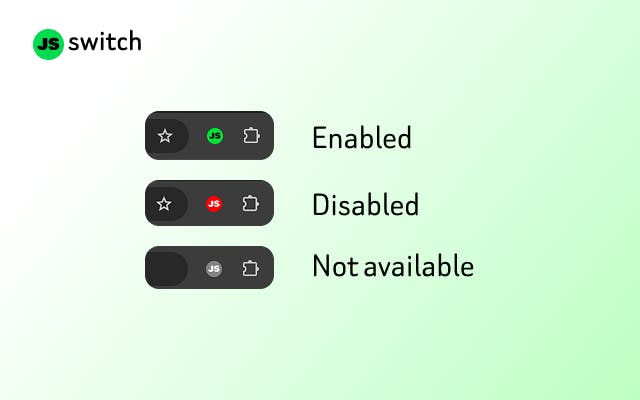
⚡ JavaScript Switch – Version 2
Today, the extension has evolved into Version 2, with features still focused on developer convenience.
🔑 Key Features
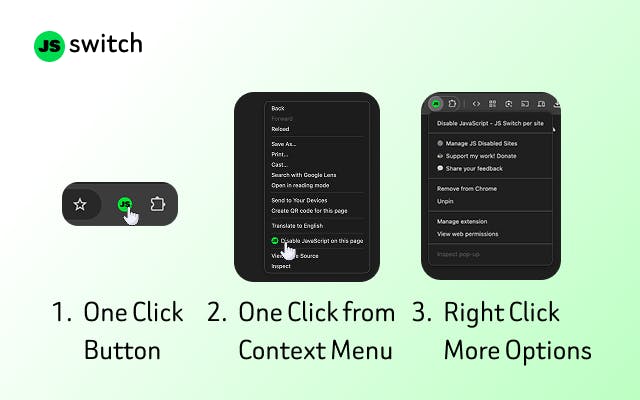
✅ One-tap JavaScript toggle
🖱️ Context menu support (right-click → toggle JS)
📄 Disabled sites management page
🔁 Easily re-enable JavaScript for selected sites
⚡ Instant effect — no page reload gymnastics
All without compromising simplicity.
👩💻 Who Is This Extension For?
This extension is built primarily for developers, but useful for power users too.
Perfect for:
Frontend developers testing non-JS fallbacks
Debugging layout issues without scripts
Blocking unwanted popups & interactions
Preventing accidental button clicks
Reducing trackers & client-side scripts
Temporarily disabling ads driven by JavaScript
Many users mentioned in reviews that they love it because:
“It does exactly what it says — fast and simple.”
That’s the best feedback I could ask for.
📊 Current Stats (and Growing)
As of now:
💙 Edge Add-ons: 28,000+ users
💛 Chrome Web Store: 2,000+ users
⭐ Reviews: Consistently positive
With recent feature updates, I expect these numbers to grow steadily in the coming days.
❤️ Final Thoughts
This extension taught me something important:
You don’t need a revolutionary idea.
You need a clear problem and a simple solution.
From an open-source inspiration → to a trimmed-down tool → to 30,000+ users. This has been one of my most satisfying side projects.
Get the extension from here 👉 JAVASCRIPT SWITCH 🔗
If you’re a developer who wants control over JavaScript with zero friction, this extension was built for you.